
 Sometimes you wish to use your GPS and data enabled mobile phone to navigate but either you do not have a data signal, or the map you require is not available through Google or BlackBerry maps. This short article will talk you through how to create a map to be used with TrekBuddy on your mobile, PDA or BlackBerry.
When mountain biking or trekking its great to have Google Maps to help guide you, but when you lose your data signal you lose your map. Additionally maps such as Google Maps in either map or ‘satellite’ view do not have the required detail, missing important features such as contour lines. In the UK Maps such as Ordnance Survey’s Explorer series range with a 1:25 000 scale provide the required amount of detail. These maps can be purchased in digital format from Memory-Maps or can be scanned. It is also possible to buy maps from Memory-Maps that can run directly of your smartphone without following this procedure.
How To
1.Obtain your map in one large file in JPEG or PNG format. If you have mapping software such as Memory Map, you can export the map by using the menu and going to Menu Bar->Map -> Image Export. You require a registered version of memory map to unlock this functionality. This creates a BMP file, this may be quite large at around 15000 by 10000 pixels and 500MB in size.
2. Crop your map to the required area using an image editor that can deal with large images, I suggest GIMP 2 which you can download here, using the save as function to create a PNG file. This will reduce the file to a more manageable size.
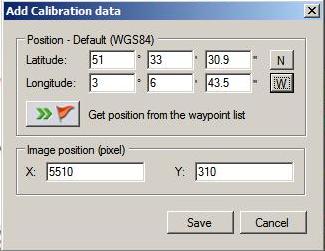 3.Next you need to calibrate your map using Map Calibrator v2.4. This can be downloaded from here. Once this is installed load your full size map, and move to each of the 4 extreme corners of the map. For this you need to pick a point on the map you know the true latitude and longitude of , you could pick a feature such as a building but I prefer to pick the intersection of 2 grid lines. Right click on the map and “add new calibration point”, carefully enter the true position of your point WGS84 format. Be careful to correctly specify the N/S E/W portion.
If you do not have the exact location for 4 features, you could use StreetMap, left click on the grid line or feature on the map and there is a link at the bottom of the page which will give you the position of where you clicked in several formats. You can also convert the UK Grid References into the correct format using this converter.
Now save the file by simply exiting Map calibrator, it should produce a .gmi calibration file.
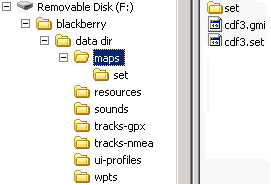 4. Now load the excellent TB Cutter, this can be downloaded from here. Specify the location of your files and accept the default formats. Depending on your PC speed and size of map this may take a few minutes. You can now copy the map to your mobile phone, you will need to copy the .gmi, .set file and the set folder which contains the tiles of the map to the maps directory of your mobile, more details of how to do so can be found in this article.
Problems and Pitfalls
1. If you use Memory-Map to save full size 1:25 000 scale maps the maps may not be saved, presumably because of low memory, try viewing each half of the map on screen in turn and then exporting it as 2 files, this can then be stitched together in GIMP.
2. If you scan maps or download maps from Memory-Maps, there may be copyright implications. It is suggested you check your licence.
22 responses so far ↓
1 Gavin // Feb 4, 2008 at 9:44 am
If you want to obtain maps without the copyright hassle may I suggest http://www.openstreetmap.org where there is an ongoing project to map the world with a CC license.
Much of the UK is pretty well done – and any contributions gratefully received!
2 shhgabay // May 16, 2008 at 10:47 am
hiiiiiiiiiii
3 Steve // Jun 13, 2008 at 9:18 am
Was fine downloading UK maps from: http://gm2tb.awokenmind.de/
Saved hassle of plotting points on an image.
4 James // Jun 13, 2008 at 12:25 pm
GoogleMaps 2 TrekBuddy is an excellent way to produce a maps of roads, but if you want a map suitable for walking or off-road cycling you need the detail that you can only obtain from a good 1:25 000 or equivalent OS map.
5 Clive // Oct 20, 2008 at 3:26 pm
How do I upload a .GPX file (from Bikely.com) to Trekbuddy on my Blackberry?
I have tried putting it in the wpts/ directory but get “No Landmark Stores” when I go to Waypoints?
6 James // Oct 20, 2008 at 9:16 pm
Clive,
I emailed this file to myself and then saved it in the waypoints folder without any problems.
Does this file work for you?
Regards
James
7 Clive // Oct 21, 2008 at 9:33 am
James, I have saved your file in wpts/, but when I use Keypad [1] – Waypoints, I get the same “No Landmark Stores” message. Am I just being dim about how to access a .gpx file?
8 James // Oct 21, 2008 at 4:48 pm
Sorry I am not sure what the problem is, try the trekbuddy forums:-
http://linuxtechs.net/kruch/tb/forum/index.php
If you fix it please call back!
James
9 Rob // Oct 22, 2008 at 7:39 pm
Clive try converting your files to “.loc” this is the format Trekbuddy likes
http://www.gpsvisualizer.com/gpsbabel/
This is a web based program which will do the convert for you or you can try GPS babel which does everything without the need for the internet
10 Sean Connolly // Feb 3, 2009 at 1:48 am
Excellent Work. Everything worked like clock work. A Big thank You.
11 Anony // Feb 25, 2009 at 3:48 pm
Why dont you just use Googleak
12 James // Feb 25, 2009 at 5:34 pm
Googleak is great if you want to make maps out of google maps. If you want to make it out of another map which you may have the method described above may be more useful.
13 Dave // Apr 16, 2009 at 10:20 am
It’s not possible within Memory Map to export the map as you suggest; there is no such function or command, certainly not in the latest version v5.x
14 James // Apr 16, 2009 at 10:50 am
Have you registered and activated your copy of Memory-Map?
15 hsevn // Apr 23, 2009 at 1:49 am
I am using some scanned maps (.jpg), all are calibrated with the file.map. How to create the file .set?
16 James // Apr 26, 2009 at 4:19 pm
Use TB Cutter (Point 4)
17 Ste // Jun 27, 2009 at 4:41 pm
Memory Map has the option to export greyed out. The help says this is because of licensing, is there any way around this?
Also, Map Calibrator seems to be not available any more?
18 Tom Richards // Jul 6, 2009 at 10:17 pm
Yup, Map Calibrator seems not to be supported any more – but try searching for “MapCalibrator2_install.exe” – this will find places where you can download it. Plug a postcode into http://getamap.ordnancesurvey.co.uk/getamap/frames.htm and you’ll get a grid reference.
19 John Thorn // Jul 28, 2009 at 12:00 pm
Some time ago I wrote a little Windows program to convert calibrations from one format to another (e.g TFW to MAP, JPR to GMI etc). With the demise of GPSTUNER’s calibrator I’ve enhanced it to work as map calibrator as well. Extending it to write TREKBUDDY tiles is fairly easy but I don’t have a Symbian phone! Would someone like to test it for me? This version is not on the website but I will email it to you. You could, for example scan a UK map, calibrate it with OS grid references and get TREKBUDDY tiles with a WGS84 .map; or a TIFF and TFW from http://www.libremap.org/data/ and get the same. The app will be free.
20 James // Jul 28, 2009 at 7:25 pm
John,
I would like to help but I no longer have a compatible phone; hopefully someone will read this and volunteer.
Best Wishes
James
21 Ian // Oct 20, 2009 at 8:51 am
John,
I have an N95 and have tried your app to create trekbuddy tile sets, starting from an OS map png of my local area. There are a couple of problems with it that I’ve found .The .map file created isn’t accepted by trekbuddy, it complains there are no calibration points in it. I compared it by hand to one created by ozimap trial, there are 4 entries missing , called MMPLL. So I opened yours in ozimap and resaved it, it creates the MMPLL points and now trekbuddy loads it.
Then I have a position error in the tiles created. using OSGB, my calibration points are on grid line intersections. loading up the created .map / tiles, Trekbuddy gives me an OSGB grid reference position which is exactly right when I stand in a known location. But the position in the map tile showing on screen, is out – I think by exactly 500M too far west. I’m getting the same issue though with ozimap/TB cutter, so I have an error somewhere…
I’ve also found that the tile set created by TB cutter is a lot smaller in disk space than yours, this could be down to a differnet tilesize though (yours 200×200, tb cutter 300×400).
22 Zrinko // Nov 12, 2012 at 10:50 am
I instaled trekbuddy ob bb8830. mine problem is that application keeps saying that im missing plugins. please help i have maps instaled and working.
Leave a Comment
(Don't forget to fill in the Captcha)