 BlackBerry smartphones are handy for GPS navigation helped by the excellent BlackBerry and Google Maps applications. When you are out of range of a data signal both these applications are unable to continue to provide a map. With TrekBuddy you can use offline maps, from Google and elsewhere, record route speed and waypoints, or use your phone as a direction finder. TrekBuddy is a great, freeware application developed by Kruch a Czech developer and is suitable for J2ME devices including a BlackBerry with OS 4.1 or greater.
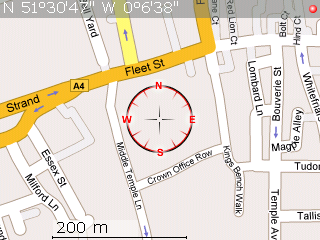
Using offline maps with TrekBuddy enables you to download maps at detail levels that suit you, that load quickly as they are stored on the SD Card, and of course do not incur any data download costs, this is especially useful when you are roaming overseas. The map on the right is a screen shot from a Curve 8310, using a map created with the excellent gm2tb- GoogleMaps to TrekBuddy site.
How To
1. Download TrekBuddy: The ALX and COD files can be found via this link.
2. Install TrekBuddy: Use the BlackBerry Application Loader to install the application. Instructions on how to use application loader can be found here.
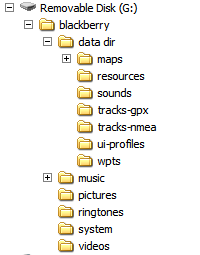 3. Set up the Folder System: Using Mass-Storage mode navigate to your SD Card using Windows Explorer, you need to create a folder called “data dir” with subdirectories called maps, resources, sounds, tracks-gpx, tracks-nmea, ui-profiles, wpts as shown on the diagram on the right.
Disconnect your BlackBerry from your PC and load the TrekBuddy application. Press the BlackBerry key to bring up the menu.
Go to Menu->Basic->Data Dir
This needs to be set to the location of the data directory you created, mine is
file:///SDCard/blackberry/data dir/
ensuring the slashes and capitalisation are correct. Next go to
Menu->Location-> GPS provider
for a BlackBerry such as the 8310 you should set it to internal GPS. If you have an external GPS puck it can be set up here.
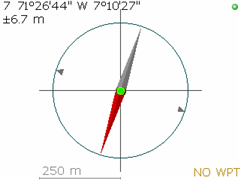
 5. Test GPS Connection: To test the GPS connection on menu, go to Start to enable GPS and then press the # key to bring up compass mode. Once you have a signal you should have a compass display with your current location like this. The green dot shows that you have a GPS signal.
6. Download a Map:As standard no maps are supplied with TrekBuddy. The easiest way to download a map quickly is using the Google Maps to TrekBuddy website by AwokenMind. To use this website use Google Maps to find the area you want to create a map for, give it a name then click download. The tar file that you create should be placed in the maps directory of your BlackBerry.
6. Use your map!: Disconnect the USB cable, load TrekBuddy, Start the GPS, and select the map you have just added.
Potential Problems
Setting Application Permissions:I didn’t need to do this, but you may need to give TrekBuddy access to your SD card and access to your internal GPS Device. This is done on the BlackBerry by navigating to
Options->Security Options->Application Permissions->TrekBuddy->Edit Permissions->Set all to'Allow'
Setting the Path to Media Card: If your path is not correct you will get the following error:
Failed to start tracklog: file://wrong-path/ net.rim.device.api.io.file.FileIOException: File system errorThis means you should carefully check your path to the SD Card
Connecting with USB: Always exit TrekBuddy before connecting the USB cable and entering Mass Storage Mode, otherwise TrekBuddy can crash and may require a battery pull.
Further Information
- TrekBuddy is not a route-planning application for calculating a route form A to B. There are better applications around if you wish to achieve this, for an application which has can continue to function in voice mode despite data connection loss try AmAze.
- To create large atlas files I recommend the excellent GoogLeak application which can be found here. This enables you to download Terrain, Hybrid and Street Map style Google Maps, and store them at various resolutions in the atlas format.
- Open Source Street Maps are available, such as OpenStreetMap, a utility to create TrekBuddy maps using this database can be found here.
- Official TrekBuddy Wiki
- Official TrekBuddy Forums
- TrekBuddy creates .gpx files which can easily be plotted on to Google Maps in elevation and 2D using a utility such as GPS Visualiser.
- A CMS theme for the Curve’s 320*240 designed by Trispark can be found here.
90 responses so far ↓
1 How to make a UK map for TrekBuddy // Feb 2, 2008 at 3:14 pm
[…] RSS ← How to install offline Maps on your BlackBerry using TrekBuddy 0.973 […]
2 marcus // Apr 2, 2008 at 3:54 am
Thank you!
3 Alex // May 12, 2008 at 2:49 am
hey, i still couldnt get this application to work
4 James // May 12, 2008 at 11:24 am
Alex,
Could you be more specific?
Regards
James
5 marcuzi // May 12, 2008 at 4:54 pm
Could you possibly explain how to “tar” the maps I created with GoogLeak so that they are faster?
I’ve seen the mumbo jumbo on linuxtechs but don’t understand… I basically just need to see the file strucutre and to be told which files I need to “.tar”
Any help is greatly appreciated. Cheers, -m
6 James // May 12, 2008 at 6:27 pm
Marcuzi,
The file structure is like this:-
Where the png files are contained within the set folder.
To tar them up…assuming you use windows:-
1.Download 7Zip from http://www.7-zip.org/.
2.Install
3.Right click on the folder or files and select 7-Zip, then add to Archive.
4. Change Archive format from 7z to tar.
5. Click OK
Regards
James
7 ian // Jun 22, 2008 at 9:32 pm
Does anyone know to to generate a tar file from an .osm or an .orm.bz file.
Cheers
Ian
8 James // Jun 23, 2008 at 10:09 am
Ian,
It should be the same as comment 6, Install 7-zip and right click on the osm file.
Regards
James
9 Jazz // Jul 7, 2008 at 9:05 pm
I have a .map file from an external GPS device… Would it be possible to use it with trekbuddy? Its from a Navigon GPS SD card.
10 James // Jul 8, 2008 at 1:17 pm
I’m sorry I don’t know what format the Navigon maps are in.
Regards
James
11 Budapest Boy // Jul 22, 2008 at 1:44 am
What is the memory usage of the maps? How much space I need to devote on my memory card?
Thanks,
BB
12 James // Jul 22, 2008 at 6:31 pm
It is very dependent on the number of “tiles” that are produced. If you produce a map at high resolution using 1:12 500 maps then it will be higher than using Google Maps at 1:50 000.
Each tile on my blackberry is approx. the are aof 1 screen on a BB curve and is 39kb. The maps that I use for walking on cycling cover a days activities and are all under 500kb.
13 Hamza // Jul 24, 2008 at 8:34 am
From Openstreet map website. How can i download the tar file. I tried donlaoding teh PNG file and then converting inot TAR but the file gives me error when i load the map on my blackberry.
14 anand // Jul 26, 2008 at 10:35 pm
I succesfully installed the trekbuddy, but when I clikc it ,BB opens the property trekbuddy file instead of the application.Help appreciated.
15 sonny // Aug 7, 2008 at 10:07 pm
hey james, i tried installing the trekbuddy .alx application (OS 4.2) (which i downloaded by right-clicking and selecting save link as) via using the BB desktop manager on my t-mobile BB 8320 curve running version 4.2.2.180 but an error occurs when i try to “add” the application. it says “No additional applications designed for your device were found” when i select the trekbuddy_bb_v42.alx file and click open. can u help me? thx. ps. i appreciate all the help!
16 James // Aug 8, 2008 at 7:00 am
Sonny,
Try the OTA (Over the air) version instead.
If you don’t have a data plan then you could download it on your PC, save it on your BlackBerry somewhere then navigate to it using “Explore” on your BB and then install it from there.
Good Luck
James
17 sonny // Aug 8, 2008 at 9:11 am
James, i’ve saved the trekbuddy .alx application on my SD card and navigated to it on my BB using explorer, but when i press the blackberry button and select “open” it says “Unable to display file /Media Card/trekbuddy_bb_v42.alx” – i don’t have a data plan, but my BB does have the wi-fi feature. thx for the quick reply
18 James // Aug 8, 2008 at 10:18 am
You need to save the OTA version, which ends in .jad rather than the .alx version
19 sonny // Aug 8, 2008 at 5:10 pm
sorry james i’m not sure which .jad file to download from the “http://linuxtechs.net/kruch/tb/releases/0.9.73/index.html” link. there are three choices, but none seem to say are for BB. can u tell me which one or where i may find it?
20 James // Aug 8, 2008 at 6:30 pm
Sorry the .jad file is here.
Regards
James
21 sonny // Aug 8, 2008 at 7:41 pm
James, i have downloaded all three .jad files and saved them on my SD card, but when i go to explore on my BB and download it, it says “download failed”. ive tried setting the application permissions to allow, but still i have no luck. when i go to details it says “909 Application authentication failure” can u help? thx for all the help so far.
22 sonny // Aug 8, 2008 at 8:07 pm
James, i’ve successfully installed the trekbuddy application using the jar. file which looked identical to the jad. file, but the jad file failed to install and the jar. file was successful. i installed the generic version, but when i try to run it, it says “error starting trekbuddy: Module ‘trekbuddy’ has verification error 2863 at offset 233a.” im not sure what this means, can u help? thx.
23 James // Aug 9, 2008 at 10:12 am
Sonny,
Sorry I’m not sure how to proceed from here…try the Trekbuddy Forums...if you fix it please post back your solution!
Jams
24 rich // Aug 11, 2008 at 10:12 pm
I’ve done all the above as instructed, set up folders, downloaded map, connected internal gps but when I then try to open a .gpx file it just says thi s….
[6] null:czkruch.track.maps.invalid map exception: unknown calibration file
All I’m trying to do is find an application that can read gpx files so I can follow a cycle route on a map using the blackberry as a guide! Is this not possible? Help much appreciated
25 James G. // Aug 19, 2008 at 4:00 pm
Just what I was looking for! I’ve been scraping around for a few days trying to find a more data-friendly approach to using the GPS in my BB.
Many thanks for this post.
26 just me // Aug 29, 2008 at 1:52 am
This works wonders….google maps without data connections….
btw… i was exploring the “amAze” for navigation…does that work on similar principal too?…does it require data connectivity?
if so its gonna be really helpful…
27 James // Aug 29, 2008 at 9:27 am
The last time I used amAze you required a data connection to access the maps.
Regards
James
28 kushal // Aug 30, 2008 at 7:45 am
Hi,
Guys i need some assistance in setting up the .alx file for 8110.
some defined instruction would be helpful
29 James // Aug 30, 2008 at 7:22 pm
Kushal,
What do you mean in setting up the alx file? Can you be more specific?
30 denal // Sep 12, 2008 at 10:08 pm
I have followed the above to use Trekbuddy and G2TB. I have a T-mobile 8800 with no data plan or a simcard. I want to be able to use the GPS and navigation software with out a data plan. I have a 2Gig SD card. I have setup the folders as shown in the article above. When I “Go to Menu->Basic->Data Dir” “Data Dir” is not there. Does anyone know why it does not show?
“file:///SDCard/blackberry/data dir/” Where does this get entered? I am unable to open a browser since i do not have a sim card. Do you enter this in The browser or somewhere else?
I would appreciate help on this matter.
31 James // Sep 13, 2008 at 9:44 am
Click on the TrekBuddy icon to open the program, press the BlackBerry Key to bring up the menu. Select Settings, then Basic, then scroll down to Data Dir at the bottom of the screen. That is where you enter the path. If you have a newer version of TrekBuddy then it may already have created the directory for you and filled in the path.
32 Melvin // Sep 27, 2008 at 8:42 pm
I tried TrekBuddy Forums but no reply after a week. I am able to load a map, get a GPS signal, move around the map. However, how do I see my location on the map (Google-To-TrekBuddy created map)? Btw, I’m doing this on a BB Pearl 8100 without Internet connectivity.
Thanks much.
33 James // Sep 27, 2008 at 10:36 pm
Assuming you have a map loaded and the GPS indicator is suggesting you have a signal (Green) then just press 5. (You may need to press the up/shift key so you are entering a 5 not G/H)
Regards
James
34 steve // Sep 28, 2008 at 8:41 pm
Hi can you put the whole of gb on in one map and if so how i have put my area in so i got that to work.
35 Melvin // Sep 29, 2008 at 3:51 am
James,
Although my lat/lon reading in line #1 above the map seems correct, the compass rosette doesn’t budge when I hit “5”. I tried Alt-5; Alt-Shift to do Num Lock and then pressed 5; simply pressing 5 also does nothing to the compass rosette. Thanks.
36 James // Sep 29, 2008 at 8:17 am
Sorry not sure of what else to suggest.
Good Luck
37 nortingo // Sep 30, 2008 at 4:28 pm
Hi I’m trying to follow your tutorial.. having problems with the map part. do you have the london map you can share ? thanks
38 James // Oct 20, 2008 at 9:19 pm
I am sorry I don’t have any detailed maps of London.
39 zammykoo // Oct 25, 2008 at 4:45 pm
Hello, this looks like an awesome software, but for some reason I keep getting an error while trying to generate my map on gm2tb. It gives me a whole page of “Warning…..” messages. Though I can generate the waypoints just fine….what’s wrong with the website?
40 zammykoo // Oct 26, 2008 at 9:49 pm
nevermind, looks like the website was down/glitchy for the past couple days
41 zammykoo // Oct 31, 2008 at 2:59 pm
so i’ve been using trekbuddy for a few days on my bb curve and i noticed on my att data usage saying its been sending bits of kb per day….. so is this really offline??
42 James E. // Nov 1, 2008 at 2:15 am
i loaded trek buddy into my curve, and i bought an external GPS receiver.
will i get directions to places in montreal now? will it give me street by street directions and something will move on the map when i move around the city?
i will load all montreal maps into my phone.
43 James // Nov 2, 2008 at 8:42 pm
I wouldn’t have thought that TrekBuddy would be sending/receiving data, but you could always ensure it doesn’t by going to Options->Advanced Options->Application Permissions->Edit Permissions and selecting deny for connections…this would stop TrekBuddy from accessing the internet etc.
44 James // Nov 2, 2008 at 8:43 pm
James E,
I am afraid TrekBuddy doesn’t give street-my-street directions; Use an on-line routing application like google maps for that.
Regards
James
45 James E. // Nov 7, 2008 at 11:40 pm
ah ok, is there any software that i can download all the maps for my SD card for my blackberry?
becuase i have the Garmin NA maps, but i can’t load them on my blackberry, only works for windows mobile
46 James // Nov 8, 2008 at 12:22 am
To convert Garmin maps to TrekBuddy use this tutorial.
47 Melvin Bernstein // Dec 3, 2008 at 1:34 am
Using TAC to create an atlas, which files go where (directory structure)? Thanks.
48 Zoff // Jan 5, 2009 at 8:15 pm
How to zoom in nad zoom out when i open the map in the trekbuddy?
49 icyfire // Jan 5, 2009 at 10:21 pm
Hi,
I have a BB 8310 and I have done everything suggested here step by step (thanks for posting this!) except when I load the Map I have downloaded, it is so far zoomed out that I can’t see detailed streets (which is what I really need to view). I tried to hit different buttons but nothing moves – I can only pan using the track ball.
Also, I am not able to get the “compass” mode by activating the GPS – is this required since I am able to load the map and view it even though without the GPS light on the top right being green?
Any help would be appreciated in regards to how I can get a zoomed in view on the map I downloaded.
Many Thanks!!! 🙂
50 James // Jan 5, 2009 at 10:40 pm
You can’t zoom in and out using TrekBuddy. The zoom level of the map is dictated by the zoom level when you created the map. If you want higher resolution you need to select a smaller area when you use http://gm2tb.awokenmind.de/
It is possible to create maps of different resolutions and package them in an “atlas” format but this is beyond the scope of this post.
Good Luck
James
51 icyfire // Jan 6, 2009 at 8:20 pm
Thank you James, i didn’t know I zooming in and out is not available on Trekbuddy. Do you know where I will be able to find detailed procedure (like what you have done for Trekbuddy Map on this article) for the “Trekbuddy ATLAS” format that you have mentioned so I will be able to utilize the zoom function?
Thanks again! 🙂
52 James // Jan 6, 2009 at 10:36 pm
An atlas is simply a number of maps packaged in the same file. If the maps are of the same area and are simply different resolutions this should give you an effective zoom feature. I don’t know of a detailed how-to but there is a link to a forum on this page:-
http://wiki.trekbuddy.net/index.php
53 Mike // Jan 7, 2009 at 1:43 am
hi, i have downloaded .alx and .cod and the maps, however when i go to basic i cant change anything… how do i see my maps?
54 Marcelo // Jan 27, 2009 at 10:04 pm
Thanks, you are great!
55 James G. // Jan 31, 2009 at 11:22 pm
@icyfire – there is not any interactive zoom (that switches from a zoomed out level to a more detailed level). To get to the more detailed zoom level, you need to press ‘7’ and select the desired scale from the list… it keeps your same location on the map, but switches to the different zoom level.
FYI: I’m using a bb pearl and created my atlases with “Trek Buddy Atlas Creator”.
Thanks again to James for this helpful post.
56 JRoberto PGran // Mar 29, 2009 at 12:55 pm
Do you know if this program runs with the garmin compatible maps. We have a Venezuela Free map and it is only Garmin compatible works with mobile xt and sybiam at http://www.gpsyv.net/Venrut.html
Thanks
57 James // Mar 29, 2009 at 7:22 pm
You may be able to convert the maps using this tutorial.
58 Kevin // Apr 15, 2009 at 4:25 am
I can’t download the alx file
59 James // Apr 15, 2009 at 4:31 pm
Try Right click then save-as
60 Gru // May 4, 2009 at 7:02 am
Can this be used on a bb 8700? Those do not have SD card, but still have 60mb+ ram, so should be able to place a city or 2 or no? 🙂
61 James // May 4, 2009 at 2:20 pm
It should work as long as you have OS 4.1 or greater. The path will obviously then differ from
file:///SDCard/blackberry/data dir/
62 calvin // May 7, 2009 at 4:14 pm
what is internal memory label ?
i dont have sdcard.. so what should i write then instead of “file:///SDCard”
63 Josh Jared // Jun 2, 2009 at 11:41 pm
Hi.
I have followed all the above steps to get Trek Buddy up and running on my Blackberry Bold 9000. The device is still asking me to create a new data dir folder and i am unable to achieve a gps signal.
Would this be anything to do with the fact that i don’t have data switched on?!
Any ideas?
josh
64 Daniel // Jul 6, 2009 at 1:04 pm
Hi,
I have managed to download the map. However, my map scale is shown at 800m. Is there a way to reduce the map scale to 200m?
Thanks.
65 James // Jul 6, 2009 at 9:53 pm
Josh:You don’t need Data to use the GPS. Has your service provider crippled GPS by disabling it? Some providers do this and then charge you a monthly fee to use it!
Daniel:The scale has to be changed when you create the map (eg using “Google Maps to TrekBuddy “) rather than once uploaded to the phone.
BW
James
66 Tony // Jul 9, 2009 at 10:01 pm
I have trekbuddy and everything was fine until i tried to open map or atlas… first i didnt know what format to use but then i decidded to use .tar files so i downloaded a tar file and it was great apparently. but in the moment of loading it well it simply says loading atlas or loading map but ive been hours with that… do u know whats the problem? i used http://gm2tb.awokenmind.de/ which is googlemaps 2 terkbuddy online tool to save the tar file…. im beginning to think i need a data plan for the first load of the map.. but wouldnt make sense…. heeeelp
67 Nick // Aug 4, 2009 at 12:56 pm
I am using the TrekBuddy Atlas Creator 1.5 and it does not seem to make a .set file like other maps, making it not work for me…….with a normal map it makes a set folder with the pngs, then a .map file, then a .set file…………but the atlas maker doesnt make the .set file so do I need this to work?
68 David // Aug 5, 2009 at 3:13 pm
Hi, I was wondering if there is some way of using custom maps. I make custom hydrographic maps of lakes as jpg, bmp etc. I’ve made kml files that work in google earth as overlays but I need something that works on a blackberry storm and the GPS. Is there some way I can upload my custom jpg files as a map and get my current location on them?
69 s // Oct 2, 2009 at 1:45 pm
on my curve 8330, i can’t get a green dot; what can i try?
70 Adriana // Feb 5, 2010 at 11:36 pm
Hi, James
Congratz, great how-to ! Really helpfull , tks!
71 ben // Feb 7, 2010 at 9:50 pm
is there anyway i can get a map of the whole of tokyo somehow?
72 Adam // Mar 12, 2010 at 4:12 pm
Installed it and works on my Blackberry Storm BUT I cant freakin zoom in ?….what the fudge?….ok this kinda make it useless then id there is only one view.
73 Akita // Mar 13, 2010 at 5:24 pm
Hi,
If you are planning to use the internal memory of blackberry then you should point the “data dir” to file:///store/where_is_data_dir_folder_can_be_found.
like file:///store/home/user/blackberry in case of BB 9550.
File::///store is the root of the internal memory card.
Regards,
74 Meher Medida // May 14, 2010 at 2:51 am
James.. Great work !!. I was able to install it in a matter of minutes. The instructions cant get any better.
75 Nirvana // Jul 20, 2010 at 6:25 pm
Thanks.
This page is excellent. No problem, no error.
76 Marco // Aug 6, 2010 at 7:51 am
Hi. what is the right map dimension I should use with my BB Curve 8900? I have installed TrukBuddy V0.9.99 and made everythin described above but when I do “load map” I always get “Invalid map dimension”. What are the “tile properties” I need to use in TB cutter? I this related to the fault I’m seeing? Thanks, Marco
77 Andy // Aug 24, 2010 at 8:29 pm
Rich made a comment above (copied below) that doesn’t seem to have been answered. I have exactly the same issue – can anyone help….
“All I’m trying to do is find an application that can read gpx files so I can follow a cycle route on a map using the blackberry as a guide! Is this not possible? Help much appreciated”
Thanks for any help!
78 calin // Sep 27, 2010 at 7:05 am
i just buy an blackbarry 8520 curve, and i saw on my menu, maps icon is missing,,,,can u tell me why is happend this?
and how can i install it,,,,and also messenger blackbarry is not working at all,,,
thank you
79 Mike // Nov 17, 2010 at 2:29 pm
The link in step #1 is no longer valid – I get “Internet Explorer cannot display the webpage
Most likely causes:
You are not connected to the Internet.
The website is encountering problems.
There might be a typing error in the address.
What you can try:
….
Any clue as to what happened to the site – http://www.medicalnerds.com/how-to-install-offline-maps-on-your-blackberry-using-trekbuddy-0973/
80 Steve // Dec 18, 2010 at 4:01 am
After many hours with a Blackberry 8330/Trekbuddy/gpsmapedit, I’ve concluded:
– to save street or topographical maps in .bmp format with the smallest street names or finest contour lines creates .bmp files so large only a very small area can be converted. For instance, creating one map for an area the size of our city results in a 4Gb file. For backcountry use, this means creating a new file for every area visited. This is fairly useless compared to a real gps, or, other than the exorbitant connection fees, using Blackberry maps (which download areas as you need them).
If anyone has a solution to this, I’d be very happy to learn of it.
To activate the Blackberry’s internal gps, under /options/advanced options/gps, you have to select “Location On”. In Trekbuddy’s Location menu, select “Internal”. “assisted gps” in the same menu means using the cellular network’s towers for a very rough location, instead of the gps satellite information. So avoid using “assisted gps”.
The Blackberry won’t find a created folder while it is still connected to the computer.
To prevent the Blackberry from accessing data services, under /options/mobile network/data services, you have to select “Off”.
Under the Blackberry’s /options/advanced options/applications you have to scroll down to Trekbuddy, select it, press /Menu, Edit permissions, and set all three “Connections”, “Interactions” and “User Data” to “Allow”.
81 Steve // Dec 18, 2010 at 4:17 am
Also, you can tell if your service provider has deactivated the gps in your Blackberry by going to /options/advanced options/gps and seeing if there’s an option to activate the gps. If there isn’t, then the provider has blocked it.
For those who didn’t buy the Blackberry from the service provider, deactivating the gps subsystem is probably not legal, certainly not right.
82 Ingmar Schmidt // Jan 5, 2011 at 2:41 pm
We have recently finished version 2 of the app, which has been enhanced with many new features.
– Offline and online maps for all of planet earth
– Offline search of point of interests nearby
– Global pedestrian routing
nogago Outdoor is now one of the best maps application available for
BlackBerry®. The app also transforms your mobile into a fully-fledged
outdoor navigation device that can track and measure time, distance
and speed of your activities; view maps of the area anytime and
offline; navigate along tracks and planed routes with routing
optimized for walking and biking.
We would be very happy, if you could feature our app again in your
blog. nogago outdoor is a great companion for international travelers
and outdoor enthusiasts alike. Our users can move with greater
privacy, outside of mobile network coverage and without paying data
roaming fees. We offer offline maps at 4.98 EUR/USD for up to 18.000
square miles as download at http://www.nogago.com, where you can also plan, find and create tracks for various weekend or after work outdoor activities and
download the app.
The app is also available on BlackBerry App World at
(http://appworld.blackberry.com/webstore/content/13904?lang=en
or http://tinyurl.com/265yoop)
Please don’t hesitate to contact us if you have questions.
83 Dmitri // Mar 15, 2011 at 7:08 am
Calin, BB 8520 Doesn’t have GPS. That’s why it’s not working.
84 mohamed // Jun 16, 2011 at 11:18 pm
hi i have a problem with my storm 2 i downloaded the program and every thing is fine but when i go to the site http://gm2tb.awokenmind.de/ and i click download map it gives me a white page with this in it (Warning: imagecopy(): supplied argument is not a valid Image resource …… ) can any body help me out here ??
85 Rahim // Jul 19, 2011 at 5:40 am
Hey I have a bb curve 8900 and was wondering if this thing uses GPS???
86 Rahim // Jul 19, 2011 at 5:41 am
Hey I have a BB Curve 8900 and wanted to ask if this thing uses GPS for navigation
87 Ingmar Schmidt // Aug 15, 2011 at 5:04 pm
The new version nogago Outdoor 2.2 provides access to four different online maps including street, topographic, skiing and public transport maps. Users can now upload their tracks directly to nogago for sharing with friends and convenient viewing. Links to the online help have been added and several bugs were fixed. Starting with this release all routing and navigation capabilities of the app are only available after purchasing a license key. Nevertheless, significant parts of the application are available for free including viewing offline and online maps and recording tracks. Therefore you can continue to use your current and existing maps with both the free and premium version. We encourage you to use your frequently updated maps by simply downloading them again.
Newly supported additional Maps:
+ Mapnik Layer OpenStreetMaps CCBYSA
+ OpenCycleMaps CCBYSA
+ OpenTransportMaps CCBYSA
+ OpenPisteMaps (SkiMaps) CCBYSA
88 Baris // Aug 28, 2011 at 4:14 am
this doesn’t work. maps cannot be created. “gif file not valid” or whatever. it was already headache enough to get trekbuddy installed. now maps cannot be downloaded. this whole crap is a waste of time. fuck blackberry, get an iphone!
89 Craig // Mar 13, 2012 at 2:15 am
Agree, doesnt work. Cant preview map – get loads of errors.
90 Yadullah // Mar 30, 2014 at 9:33 am
Hi, I cannot download the maps.. whenever i click on download map on the gm2tb site just nothing happens!!!
Leave a Comment
(Don't forget to fill in the Captcha)